A Complete Guide for Modern Engineering and BIM Workflows
In today’s engineering and construction environment, structural modeling software is no longer a luxury — it’s a necessity. As buildings, infrastructure, and industrial projects become more complex, digital tools allow engineers to design more accurately, collaborate more efficiently, reduce risks, and deliver results faster. Structural modeling software forms the foundation of this digital transformation, especially with the global shift toward Building Information Modeling (BIM).
This guide provides a clear, semi-technical overview of structural modeling software, focusing on how it supports design, documentation, coordination, and construction. It is intended for engineers, project managers, and business clients who want to understand how these tools influence project quality, cost, and delivery.
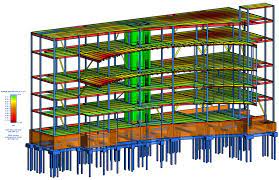
Structural Modeling vs Structural Analysis: What’s the Difference?
Structural modeling and structural analysis are often mentioned together, but they play completely different roles in a project.
Structural Modeling
- Creates the physical 3D representation of a building or structure
- Defines geometry, dimensions, members, materials, and connections
- Serves as the “source of truth” for all project disciplines
- Produces drawings, details, schedules, and fabrication outputs
Structural Analysis
- Uses mathematical models to predict how a structure behaves
- Simulates loads, displacements, stresses, dynamic effects, buckling
- Supports compliance with engineering codes
- Provides calculations for safety and performance
In practice, structural modeling tools communicate with analysis tools. For example:
- Revit → modeling
- Robot, SAP2000, ETABS, STAAD → analysis
The better these systems integrate, the smoother the engineering workflow becomes.
BIM-Centric Modeling Workflows
Modern projects use BIM as the backbone of design and construction. Structural modeling software is a key contributor to the BIM ecosystem.
What BIM-centric workflows offer
- A shared digital environment across architecture, structure, and MEP
- Automatic updates across plans, sections, and schedules
- Accurate planning and cost estimation
- Reduced clashes and fewer site changes
- Faster approvals with coordinated documentation
For clients, BIM means predictability, reduced risks, and better project visibility.
For engineers, it means better control, fewer mistakes, and more consistent deliverables.
Object Libraries and Parametric Families
One of the greatest strengths of structural modeling software is the ability to use smart, parametric components.
Examples of structural objects
- Beams and columns
- Slabs, walls, and foundations
- Steel plates, stiffeners, bolts
- Reinforcement bars and meshes
- Precast concrete elements
These objects contain geometry + information:
material, grade, dimensions, weights, reinforcement, fabrication rules, and more.
Benefits of parametric modeling
- Change one parameter → the entire model updates
- Reusable, standardized elements
- More accurate material quantities
- Faster modeling of repetitive structures
- Stronger quality control
For companies, this improves consistency and reduces training time for new engineers.
Coordination with Trades (MEP/Arch): Minimizing Conflicts
Structural engineering does not happen in isolation. The structure must integrate perfectly with architectural elements and MEP (mechanical, electrical, plumbing) systems.
Structural–Architectural Coordination
- Aligning grids and levels
- Ensuring beams match wall layouts
- Coordinating slab edges with façade systems
Structural–MEP Coordination
- Ensuring ducts don’t collide with beams
- Providing openings and sleeves
- Maintaining clearances for cables and pipes
Structural modeling software enables real-time coordination, preventing costly issues during construction.
Clash Detection and Issue Tracking
This is one of the biggest advantages of using digital modeling tools.
What clash detection does
- Automatically identifies geometry conflicts
- Flags overlapping elements (steel frames, ducts, pipes, rebar)
- Reduces on-site errors and delays
- Improves safety and constructability
Issue-tracking platforms
- Autodesk BIM 360 / ACC
- Navisworks
- Solibri
- BIMCollab
- Trimble Connect
These tools let teams assign issues, track resolutions, and maintain an audit trail — essential for high-quality project delivery.
Level of Development (LOD) and Documentation Outputs
Level of Development (LOD) defines how detailed each part of the model is at different stages.
Typical LOD levels
- LOD 100–200: Concept and early design
- LOD 300: Coordinated structural model
- LOD 350–400: Fabrication-ready model with connections
- LOD 500: As-built model
Documentation outputs generated from the model
- Structural floor plans and sections
- Beam, column, and foundation schedules
- Reinforcement drawings and bending schedules
- Steel fabrication drawings
- Precast shop drawings
- Quantity take-offs (concrete, steel, rebar)
Structural modeling software automates these outputs, reducing drafting time by 40–70%.
Interoperability & Open Standards: Smooth Data Exchange
Because large projects use multiple software platforms, interoperability is essential.
Common open standards
- IFC (Industry Foundation Classes) for BIM data
- BCF (BIM Collaboration Format) for issue exchange
- DWG/DXF for CAD formats
- STEP/CIS/2 for steel fabrication
- LandXML for infrastructure
Why it matters
- Avoid vendor lock-in
- Simplify collaboration between different tools
- Reduce file translation errors
- Future-proof project data
For business clients, interoperability reduces risks related to software compatibility or contractor capability.
Performance on Large Models
Large-scale models—industrial plants, towers, airports, stadiums—can contain millions of elements.
Common performance issues
- Slow navigation
- Long save or load times
- Crashes due to memory overload
- Broken links or corrupted models
Performance optimization strategies
- Split the model into zones or levels
- Use linked models (architecture, MEP, structure)
- Purge unused families and materials
- Limit unnecessary 3D details
- Use worksets for large teams
- Optimize view templates
Good performance reduces frustration and keeps project timelines on track.
Templates and Automation Scripts
Standardization and automation are key to improving productivity.
Templates include
- Standard object libraries
- Company-specific families
- Predefined drawings and dimension styles
- Annotation standards
- View templates for consistency
Automation tools
- Dynamo (Revit visual scripting)
- Grasshopper (Rhino + structural plugins)
- Tekla Open API
- Python scripts for custom automation
- Macros for repetitive tasks
What automation can do
- Generate repetitive geometry
- Create reinforcement layouts
- Batch-create drawings and sheets
- Run model audits
- Export reports automatically
Automation allows structural teams to save hundreds of hours on every project.
Quality Checks and Model Audits
Quality assurance is essential for delivering reliable engineering outputs.
Typical QC checks
- Missing connections
- Duplicate elements
- Unsupported framing members
- Incorrect member sizes or materials
- Rebar clashes and cover violations
- Level mismatches
- Incorrect LOD definitions
Tools for model audits
- Solibri
- Navisworks
- Revit audit tools
- Tekla model checker
- Custom Python/Dynamo scripts
Regular audits prevent major coordination issues and ensure compliance with BIM Execution Plans (BEP).
Cloud Collaboration & Common Data Environments (CDEs)
Cloud-based working is now standard for engineering teams.
Examples of CDE platforms
- Autodesk BIM 360 / ACC
- Trimble Connect
- ProjectWise
- Revizto
- Aconex
Advantages of cloud collaboration
- Real-time model updates
- File version history and rollback
- Centralized communication
- Remote teamwork (essential for global projects)
- Model coordination and issue tracking
- Secure sharing with clients and contractors
For business clients, cloud platforms offer transparency and better progress monitoring.
Vendor Landscape and Software Selection
Choosing the right structural modeling tool depends on the type of projects and company workflows.
Major vendors and strengths
| Vendor | Strength |
| Autodesk (Revit) | Best for multi-discipline BIM; widely used globally |
| Trimble (Tekla Structures) | Leader in steel & concrete detailing and fabrication |
| Bentley (ProStructures) | Strong in infrastructure and industrial plants |
| Nemetschek (Allplan) | Detailed modeling, especially in European markets |
| Rhino/Grasshopper | Advanced geometry and complex form generation |
Key selection factors
- Project type (buildings vs infrastructure)
- Required level of detail (LOD 300 vs fabrication-level)
- Team experience and training
- Compatibility with contractors
- Automation needs
- Interoperability with analysis tools
- Long-term licensing and support
Choosing correctly ensures efficient delivery and fewer integration problems.
Conclusion
Structural modeling software is at the heart of modern engineering and construction. It enables engineers and companies to create accurate 3D models, coordinate smoothly with other disciplines, reduce risks, automate documentation, and deliver high-quality, cost-effective projects.
For engineering firms, adopting the right tools enhances productivity and competitiveness. For business clients, these tools mean more predictable budgets, fewer variations, and a smoother construction process.
As the industry continues moving toward fully digital and automated workflows, structural modeling software will become even more powerful — integrating AI, generative design, cloud computation, and real-time fabrication data.