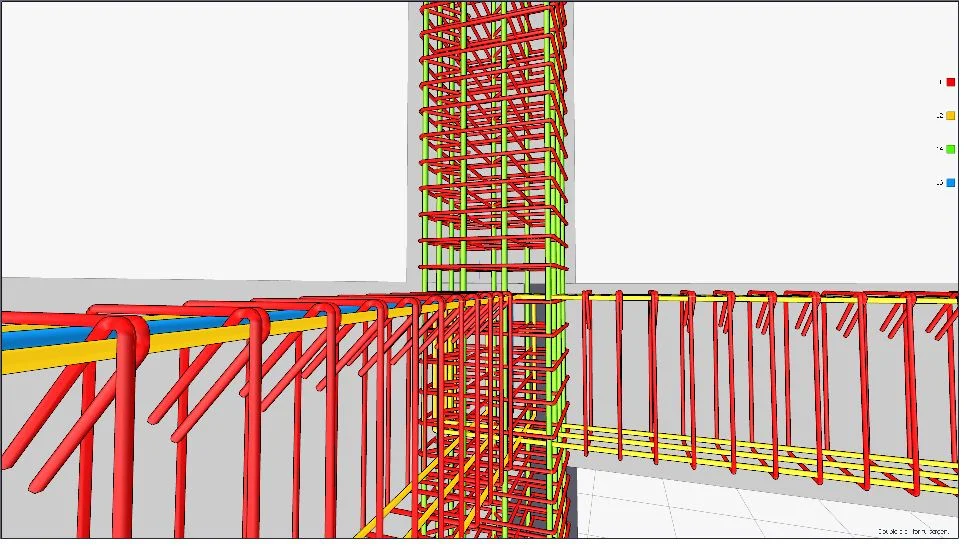
Enhancing Accuracy, Efficiency, and Project Success
In the world of construction and engineering, precision and efficiency in structural detailing are paramount. Structural detailing is the process of preparing detailed drawings, plans, and models that specify how a structure will be fabricated and assembled. From steel connections and reinforcement layouts to complex assemblies and integrated building systems, high-quality detailing ensures projects are executed accurately, safely, and cost-effectively.
With the growing complexity of modern infrastructure, choosing the right structural detailing software has become a critical decision for engineering firms, contractors, and project managers. This blog explores the leading software tools available, compares 2D vs 3D detailing, highlights automation features, and provides guidance on selecting software based on project scale.
Why Structural Detailing Software Matters
Structural detailing is more than just drawing lines on paper or a computer screen. It bridges the gap between design and construction, ensuring that structural engineers’ visions translate into real-world assemblies. Detailed and accurate structural plans:
- Reduce errors during fabrication and construction: Correctly detailed drawings prevent misalignment, overcuts, or improper assembly of steel or concrete elements.
- Improve collaboration across teams: Fabricators, contractors, and engineers can work from a single source of truth, reducing miscommunication.
- Enhance project timelines and efficiency: Automated software tools accelerate detailing workflows, reduce manual drafting, and enable quick revisions.
- Support compliance with codes and standards: Modern software integrates design codes and construction standards, minimizing the risk of regulatory violations.
For engineering consulting companies like Avesta Consulting, investing in high-quality structural detailing software ensures reliability and efficiency across a range of infrastructure, industrial, and commercial projects.
Comparison of Leading Structural Detailing Software
There are multiple structural detailing software solutions available today, each with its own strengths, capabilities, and ideal use cases. Here’s a comparative overview of some of the most widely used tools in the industry:
1. Tekla Structures
Overview: Tekla Structures, developed by Trimble, is one of the most advanced 3D structural detailing software tools available. It supports steel, concrete, and timber structures, allowing users to create fully detailed, fabrication-ready models.
Key Features:
- Fully parametric 3D modeling
- Clash detection and model coordination
- Automatic generation of shop drawings
- Integration with BIM workflows
- Material takeoffs and cost estimation
Pros:
- Highly accurate and detailed
- Supports large and complex structures
- Excellent collaboration tools
Cons:
- High learning curve for beginners
- Requires substantial hardware resources
Best for: Large-scale infrastructure projects, industrial plants, and complex commercial buildings.
2. Advance Steel
Overview: Developed by Autodesk, Advance Steel is a 3D modeling and detailing solution specifically for steel structures. It integrates well with AutoCAD, making it accessible to teams familiar with the Autodesk ecosystem.
Key Features:
- 3D modeling for steel fabrication
- Automatic creation of drawings and BOMs
- Parametric connections
- Integration with Revit for BIM workflows
Pros:
- Familiar Autodesk interface
- Strong parametric tools
- Good for fabrication and shop floor documentation
Cons:
- Limited concrete detailing features
- Less suited for extremely large industrial projects
Best for: Medium to large steel structure projects where integration with AutoCAD/Revit is a priority.
3. SDS/2
Overview: SDS/2 is a specialized software for steel detailing and fabrication. It emphasizes automation, data accuracy, and detailed steel connection modeling.
Key Features:
- 3D modeling with parametric steel connections
- Automatic generation of shop drawings
- BOM and material tracking
- Clash detection
Pros:
- Highly automated and efficient
- Precise steel fabrication output
- Supports complex connection types
Cons:
- Primarily steel-focused
- Requires training for optimal use
Best for: Steel fabrication shops and projects with heavy reliance on automated detailing.
4. Revit Structure
Overview: Revit, from Autodesk, is a BIM-centric software solution that includes structural detailing capabilities. While not as specialized as Tekla or Advance Steel for fabrication, it excels in integrated design workflows.
Key Features:
- Parametric modeling of structural components
- Integration with architectural and MEP models
- Generation of drawings and schedules
- Coordination across BIM projects
Pros:
- Excellent BIM integration
- Useful for multi-disciplinary projects
- Cloud collaboration capabilities
Cons:
- Less automation for steel shop drawings
- Limited advanced steel detailing compared to Tekla or SDS/2
Best for: Building projects where collaboration with architectural and MEP teams is critical.
5. IDEA StatiCa
Overview: IDEA StatiCa specializes in connection design and analysis. It is often used alongside other 3D modeling software to verify structural connections and optimize design.
Key Features:
- Advanced connection analysis
- Design code compliance checks
- Integration with BIM and CAD platforms
Pros:
- Excellent for connection verification
- Saves time on manual calculations
- Optimizes material usage
Cons:
- Focused on connections, not full project modeling
- Requires integration with other modeling software
Best for: Engineers needing precise connection analysis for steel and concrete structures.
2D vs 3D Detailing
2D Detailing
Traditionally, structural detailing was done using 2D CAD software. While still used for smaller projects, 2D detailing has limitations:
- Higher risk of errors in complex assemblies
- Limited visualization of the full structure
- Time-consuming revisions
Advantages:
- Simple for small-scale projects
- Lower software cost
- Minimal hardware requirements
Disadvantages:
- Not suitable for complex or multi-story structures
- Difficult to coordinate with other disciplines
- Manual updates increase the likelihood of errors
3D Detailing
3D structural detailing represents a complete digital model of the structure, offering significant advantages over 2D:
- Improved accuracy and reduced errors
- Clash detection before construction
- Automatic generation of fabrication drawings
- Integration with BIM and project management systems
Advantages:
- Highly accurate and detailed models
- Supports complex geometries
- Facilitates collaboration across teams
Disadvantages:
- Higher initial cost
- Steeper learning curve
- Requires stronger hardware
Conclusion: While 2D detailing remains useful for smaller or simpler projects, 3D detailing software is essential for medium to large-scale infrastructure, industrial, and commercial projects where accuracy, automation, and collaboration are critical.
Automation in Steel Detailing
Modern structural detailing software increasingly incorporates automation features to enhance productivity and reduce manual effort. Examples include:
- Automatic connection generation: Software can automatically place standard connections based on geometry and load requirements.
- Auto-dimensioning and annotation: Drawings are automatically annotated with dimensions, reducing manual errors.
- BOM and material takeoff generation: Real-time updates of material lists as the model changes.
- Clash detection and validation: Identifies conflicts between structural, architectural, and MEP components.
- Code compliance checks: Ensures connections, members, and assemblies adhere to design codes and standards.
Automation significantly reduces project timelines, improves accuracy, and allows engineers to focus on optimization rather than repetitive drafting tasks.
Choosing Software Based on Project Scale
Selecting the right structural detailing software depends largely on the size, complexity, and discipline integration of your project:
Small Projects
- Software Recommendation: 2D CAD or Revit Structure (light usage)
- Why: Minimal complexity, limited collaboration requirements
- Pros: Low cost, simple to learn
Medium Projects
- Software Recommendation: Advance Steel or Revit Structure with some Tekla integration
- Why: Moderate complexity, integration with BIM desirable, occasional fabrication automation needed
- Pros: Parametric modeling, fabrication drawings, moderate automation
Large or Complex Projects
- Software Recommendation: Tekla Structures, SDS/2, IDEA StatiCa for connection verification
- Why: High complexity, multi-disciplinary coordination, fabrication-ready detailing, heavy steel structures or industrial plants
- Pros: Full 3D modeling, advanced automation, clash detection, BIM integration
Considerations:
- Hardware and IT infrastructure
- Team training and expertise
- Integration with existing BIM workflows
- Client or regulatory software requirements
Conclusion
Structural detailing software is a cornerstone of modern construction engineering. The right tool can dramatically reduce errors, improve efficiency, and ensure compliance with design standards. From small 2D CAD projects to complex 3D steel and concrete structures, software choices like Tekla Structures, Advance Steel, SDS/2, Revit, and IDEA StatiCa offer specialized capabilities tailored to different project scales.
Understanding the differences between 2D and 3D detailing, leveraging automation, and carefully selecting software based on project size and complexity ensures that engineering firms like Avesta Consulting can deliver accurate, cost-effective, and high-quality solutions to clients across infrastructure, industrial, and commercial sectors.
Investing in the right structural detailing software not only enhances your SEO performance and CTR by showcasing technological expertise but also positions your firm as a leader in precision engineering, collaboration, and innovation.
Avesta Consulting provides expert guidance on structural detailing, software selection, and implementation for projects of any scale, ensuring optimized workflows, improved accuracy, and faster project delivery.