Modern logistics and supply chain operations are becoming increasingly complex. Global trade, e-commerce growth, fluctuating demand, and intricate distribution networks require companies to manage thousands of interconnected activities simultaneously. From warehouse operations and transportation planning to inventory management and order fulfillment, even minor inefficiencies can result in significant delays and increased operational costs.
To address these challenges, organizations are increasingly adopting business process simulation tools. These tools allow companies to create digital models of their operations and test different scenarios before implementing real-world changes. Instead of relying on guesswork, managers can simulate logistics workflows, analyze bottlenecks, and optimize processes using data-driven insights.
Business process simulation is particularly valuable in complex logistics environments, where small adjustments can have cascading effects throughout the entire supply chain. By simulating workflows, companies can experiment with alternative strategies, evaluate risks, and improve decision-making without disrupting daily operations.
This article explores business process simulation tools, their key features, implementation steps, and applications in logistics and supply chain management.
What Are Business Process Simulation Tools?
Definition of business process simulation
Business process simulation refers to the use of digital models to replicate and analyze real-world business processes. These models represent workflows, resources, activities, and decision points within an organization.
Simulation tools enable organizations to mimic the behavior of complex systems over time. By using real operational data and logical rules, companies can test how different conditions affect process performance.
In logistics operations, business process simulation tools model elements such as:
- Order processing activities
- Warehouse picking and packing operations
- Transportation scheduling
- Inventory movement
- Distribution network flows
Instead of implementing changes directly in real operations, companies can test different scenarios in a simulated environment. This reduces risks, improves planning accuracy, and enables managers to understand the impact of operational changes before they occur.
Business process simulation is closely related to process modeling, operations research, and digital twin technologies. Together, these techniques help organizations visualize workflows, predict outcomes, and optimize system performance.
Why simulation is critical for complex logistics workflows
Logistics workflows involve multiple interconnected components including suppliers, warehouses, transportation systems, and customers. Each component interacts with others in ways that can be difficult to predict using traditional analysis methods.
For example, consider a distribution center that processes thousands of orders per day. A small delay in picking operations may create congestion in packing stations, which then affects loading schedules and delivery timelines. Without simulation tools, identifying these relationships is extremely difficult.
Simulation becomes critical for logistics workflows because it allows companies to:
Understand system behavior
Complex logistics networks often contain hidden dependencies. Simulation models reveal how different parts of the system influence one another.
Evaluate operational strategies
Managers can test different warehouse layouts, transportation routes, or staffing levels to determine the most efficient configuration.
Anticipate demand fluctuations
Simulation helps organizations understand how seasonal demand spikes or unexpected disruptions affect supply chain performance.
Improve operational resilience
By testing worst-case scenarios, businesses can prepare contingency plans and ensure smoother operations during disruptions.
As logistics networks become more global and interconnected, simulation tools provide essential insights that traditional planning techniques cannot deliver.
Difference between static and dynamic simulation
Business process simulations can be categorized into static simulations and dynamic simulations.
Static simulation
Static simulations analyze processes under fixed conditions. They do not incorporate time-based changes or real-time interactions between variables.
In logistics environments, static simulations might evaluate:
- Average order processing time
- Fixed transportation routes
- Constant demand levels
Although static models provide useful insights, they cannot accurately represent the dynamic nature of supply chain operations.
Dynamic simulation
Dynamic simulation models represent processes as they evolve over time. These models incorporate variables such as demand fluctuations, resource availability, and unexpected disruptions.
Dynamic simulation allows organizations to analyze:
- Peak demand periods
- Transportation delays
- Equipment failures
- Staffing shortages
- Inventory shortages
Dynamic models provide a far more realistic representation of logistics workflows. As a result, they are widely used for analyzing complex supply chain systems.
Key Features of Business Process Simulation Tools
Process modeling and mapping
One of the most important capabilities of simulation tools is process modeling. This feature allows organizations to visually represent workflows using diagrams and logical structures.
Process modeling typically includes:
- Activity flow diagrams
- Resource allocation models
- Process timing structures
- Decision rules and conditions
For logistics workflows, process models may represent:
- Warehouse receiving procedures
- Order fulfillment workflows
- Transportation scheduling
- Inventory replenishment processes
These models create a structured representation of operations that can be analyzed and improved.
Process mapping also helps teams identify redundant steps, inefficiencies, and unnecessary process delays.
Scenario testing and “what-if” analysis
Simulation tools allow organizations to conduct scenario testing, often referred to as “what-if analysis.”
This feature enables companies to test different operational strategies without affecting real-world operations.
Examples of scenario testing include:
- Adding more warehouse staff during peak periods
- Changing delivery routes
- Implementing automated sorting equipment
- Adjusting inventory reorder points
By comparing the outcomes of multiple scenarios, organizations can determine which strategy provides the best performance.
What-if analysis is particularly valuable when planning large-scale operational changes such as warehouse expansions or supply chain restructuring.
Data-driven analytics and dashboards
Modern simulation tools incorporate advanced data analytics and visualization dashboards.
These dashboards provide insights into operational performance indicators such as:
- Process cycle time
- Resource utilization
- Throughput rates
- Queue lengths
- Inventory levels
Visualization tools allow managers to interpret complex simulation results quickly and make informed decisions.
Analytics dashboards may also provide predictive insights by identifying potential bottlenecks or operational risks.
Integration with ERP and logistics systems
Another important feature of simulation tools is their ability to integrate with existing enterprise systems.
These systems may include:
- Enterprise Resource Planning (ERP) systems
- Warehouse Management Systems (WMS)
- Transportation Management Systems (TMS)
- Inventory management platforms
Integration ensures that simulation models use real operational data, improving the accuracy and reliability of results.
When simulation tools connect directly to business systems, organizations can maintain continuously updated models that reflect current operations.
This capability supports digital twin implementations, where a virtual model continuously mirrors real-world logistics activities.
Steps to Simulate Complex Logistics Workflows
Step 1: Define workflow boundaries and objectives
The first step in business process simulation is defining the scope of the workflow to be analyzed.
Organizations must determine:
- Which part of the logistics network will be simulated
- What performance metrics should be evaluated
- What operational problems need to be addressed
Clear objectives ensure that the simulation project remains focused and produces actionable insights.
Typical objectives may include reducing order processing time, optimizing warehouse layouts, or improving transportation efficiency.
Step 2: Collect relevant process and operational data
Accurate data is essential for building reliable simulation models.
Organizations must collect information such as:
- Process cycle times
- Order volumes
- Equipment capacity
- Workforce availability
- Transportation schedules
- Inventory levels
Data may come from operational databases, ERP systems, historical reports, or direct observations.
The quality of the simulation model largely depends on the accuracy and completeness of this data.
Step 3: Build a digital model of the workflow
Once the data has been collected, the next step is constructing the simulation model.
This model includes:
- Workflow structures
- Process sequences
- Resource allocation rules
- Operational constraints
The model replicates the real-world logistics process as closely as possible.
In advanced implementations, organizations create digital twins that mirror real operations in real time.
Step 4: Run simulations under varying conditions
After the model is created, simulation experiments can begin.
These experiments test different operational conditions, such as:
- Increased order volumes
- Equipment failures
- Staffing shortages
- Alternative warehouse layouts
Running multiple simulation scenarios helps organizations understand how changes affect system performance.
Simulation tools often run thousands of iterations to evaluate a wide range of potential outcomes.
Step 5: Analyze results and identify bottlenecks
Simulation results provide insights into operational performance.
Analysts examine metrics such as:
- Queue lengths
- Resource utilization
- Processing delays
- Throughput rates
By analyzing these metrics, organizations can identify process bottlenecks and inefficiencies.
For example, a simulation may reveal that a packing station is overloaded while picking operations remain underutilized.
Step 6: Recommend process improvements
The final step is translating simulation insights into actionable recommendations.
Potential improvements may include:
- Rebalancing workloads
- Changing warehouse layouts
- Adjusting staffing schedules
- Optimizing transportation routes
Organizations may run additional simulations to validate these improvements before implementing them in real operations.
Top Tools for Business Process Simulation
AnyLogic
AnyLogic is a widely used simulation platform that supports discrete event simulation, system dynamics, and agent-based modeling.
It is particularly useful for complex logistics and supply chain systems because it allows organizations to model multiple interacting processes simultaneously.
Key capabilities include:
- Supply chain modeling
- Transportation network simulation
- Warehouse optimization
- Multi-method simulation approaches
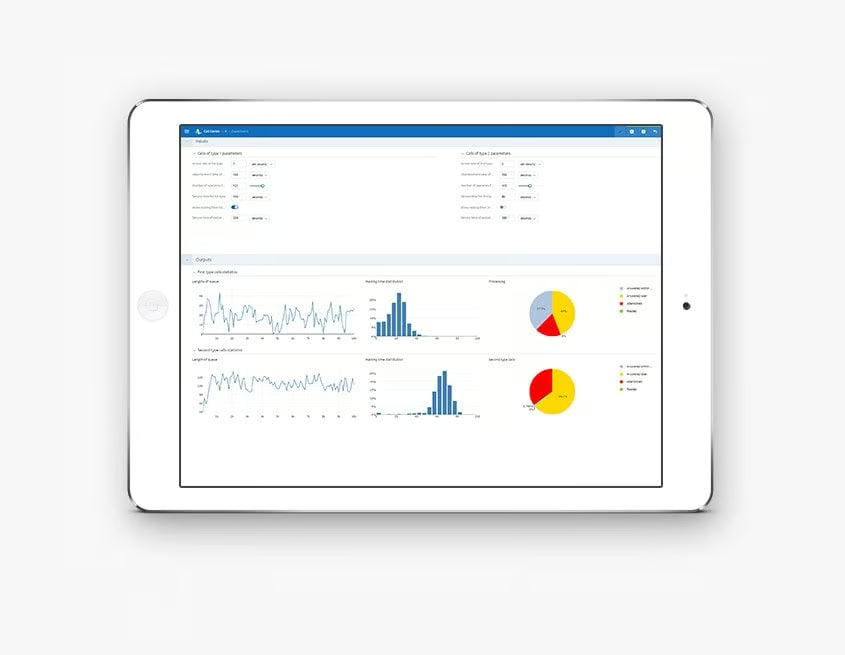
Simul8
Simul8 is known for its intuitive interface and powerful process simulation capabilities.
The software allows organizations to model business workflows quickly and evaluate performance improvements through scenario testing.
Simul8 is commonly used in:
- manufacturing operations
- logistics systems
- healthcare workflows
- service industry processes
FlexSim
FlexSim specializes in 3D simulation modeling, making it particularly useful for visualizing warehouse and distribution center operations.
The platform provides detailed representations of:
- material handling systems
- conveyor networks
- automated storage systems
- robotic operations
The 3D environment helps managers better understand how logistics processes operate within physical spaces.
Arena Simulation
Arena Simulation is a powerful tool used for analyzing operational processes in manufacturing and logistics environments.
Its strengths include:
- complex process modeling
- statistical analysis capabilities
- detailed resource scheduling models
Arena is often used in industrial engineering and operations research projects.
ExtendSim
ExtendSim provides flexible modeling capabilities for complex systems and allows organizations to simulate both continuous and discrete processes.
The platform supports advanced data analysis, making it useful for large-scale logistics and supply chain simulations.
ExtendSim is often used in:
- transportation modeling
- distribution planning
- resource allocation analysis
Applications in Logistics and Supply Chain
Warehouse optimization
Warehouse operations involve multiple processes such as receiving, storage, picking, packing, and shipping.
Simulation tools help organizations analyze warehouse performance by modeling these activities.
Companies can evaluate:
- warehouse layout efficiency
- picking strategies
- equipment utilization
- staffing levels
These insights help improve warehouse throughput and reduce operational delays.
Transportation and routing analysis
Transportation networks are highly dynamic and influenced by factors such as traffic conditions, fuel costs, and delivery schedules.
Simulation tools enable companies to test different routing strategies and evaluate transportation performance.
This helps organizations reduce delivery times, lower transportation costs, and improve service reliability.
Inventory flow management
Inventory management is a critical component of supply chain performance.
Simulation models allow organizations to evaluate inventory policies under varying demand conditions.
Companies can test strategies such as:
- safety stock levels
- reorder point adjustments
- distribution center allocation
These insights help balance inventory costs with service level requirements.
Multi-echelon supply chain modeling
Many supply chains consist of multiple layers including suppliers, distribution centers, regional warehouses, and retail outlets.
Simulation tools allow organizations to model these complex networks and evaluate how changes in one part of the system affect overall performance.
Multi-echelon modeling helps companies optimize inventory placement, transportation flows, and distribution strategies.
Benefits of Using Simulation Tools
Reduce operational costs and inefficiencies
Simulation tools help organizations identify inefficient workflows and unnecessary resource usage.
By optimizing logistics operations, companies can reduce transportation costs, warehouse expenses, and inventory holding costs.
Improve decision-making accuracy
Traditional decision-making methods often rely on assumptions or incomplete data.
Simulation tools provide data-driven insights that improve the accuracy of operational decisions.
Managers can evaluate multiple strategies before selecting the most effective option.
Predict impact of process changes
Implementing operational changes without proper analysis can be risky.
Simulation allows organizations to evaluate the potential impact of changes before they occur.
This reduces the likelihood of costly mistakes and operational disruptions.
Enhance supply chain resilience
Supply chains face increasing risks from global disruptions, demand fluctuations, and geopolitical uncertainties.
Simulation tools help organizations prepare for these uncertainties by testing contingency scenarios and developing resilient operational strategies.
Common Challenges
Complex data integration
Integrating simulation tools with enterprise systems can be technically challenging.
Organizations must ensure that data from ERP, WMS, and logistics platforms is accurate and compatible with simulation models.
Model accuracy and validation
Simulation models must accurately represent real-world processes.
If the model assumptions are incorrect or data is incomplete, simulation results may be unreliable.
Organizations must validate models using historical data and operational observations.
High learning curve for staff
Advanced simulation tools can be complex and require specialized knowledge.
Organizations may need to invest in training or hire experts in operations research and simulation modeling.
Best Practices for Effective Simulation
Start with high-impact workflows
Organizations should begin simulation projects with processes that have the greatest operational impact.
Examples include warehouse operations, transportation planning, and inventory management.
Starting with high-impact areas ensures measurable improvements.
Validate models with historical data
Simulation models should be tested against historical performance data to verify their accuracy.
Validation ensures that simulation results reflect real operational behavior.
Engage cross-functional teams
Successful simulation projects require collaboration between logistics managers, IT specialists, analysts, and operational staff.
Cross-functional teams ensure that simulation models accurately represent real processes.
Continuously monitor and update simulations
Logistics systems evolve over time due to changing demand patterns, technology adoption, and operational strategies.
Organizations should regularly update simulation models to ensure they remain accurate and relevant.
Continuous monitoring allows companies to maintain optimized logistics workflows and adapt to future challenges.
Conclusion
Business process simulation tools have become essential for managing complex logistics workflows. By creating digital models of operational systems, organizations can analyze process performance, identify bottlenecks, and evaluate strategic improvements without disrupting real-world operations.
From warehouse optimization and transportation planning to multi-echelon supply chain modeling, simulation tools provide powerful insights that support better decision-making. As logistics networks continue to grow in complexity, simulation technologies will play an increasingly important role in helping organizations improve efficiency, reduce costs, and build resilient supply chains.
Companies that adopt simulation tools and integrate them with real operational data gain a significant competitive advantage in today’s fast-paced global marketplace.
Image Alt Text
- Business process simulation model visualizing complex logistics workflow and supply chain operations
- Digital simulation dashboard analyzing warehouse operations and logistics process performance