A Comprehensive Guide to Modern Structural Design and Simulation
Structural analysis software has become an essential tool in modern engineering practice. From conceptual design to detailed verification, these tools enable engineers to predict how structures behave under various loading conditions, optimize material usage, and ensure compliance with design codes and safety regulations.
As projects become more complex and timelines tighter, reliance on accurate and efficient structural analysis and design software continues to grow. Whether designing a high-rise building, bridge, industrial frame, offshore structure, or mechanical assembly, engineers must choose the right analysis approach and software platform.
This article provides a comprehensive overview of structural analysis software, compares 2D vs 3D structural analysis, explores civil engineering applications, explains BIM and CAD integration, and offers guidance on how to choose the right structural analysis software for your project.
What Is Structural Analysis Software?
Structural analysis software is a class of engineering tools used to simulate and evaluate the behavior of structures under applied loads, environmental conditions, and boundary constraints.
These tools help engineers assess:
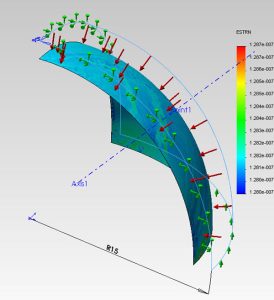
Stress and strain distribution
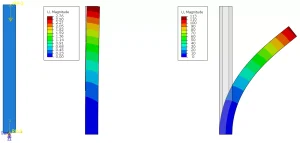
Deflections and deformations
Stability and buckling behavior
Dynamic and seismic response
Fatigue and failure risks
By solving mathematical models based on mechanics of materials and structural theory, the software predicts whether a structure will perform safely and efficiently throughout its service life.
Structural Analysis and Design Software: Key Capabilities
Modern structural analysis and design software goes beyond simple calculations. Typical capabilities include:
Linear and Nonlinear Analysis
Linear static analysis for small deformations
Material nonlinearity (plasticity, cracking)
Geometric nonlinearity (large deformation, buckling)
Static and Dynamic Loading
Dead, live, wind, and snow loads
Seismic and time-history analysis
Impact and transient loading
Code-Based Design
Automatic checks against international standards (AS, Eurocode, AISC, ACI, BS, ISO)
Load combinations and safety factors
Finite Element Analysis (FEA)
Beam, shell, and solid elements
Mesh refinement and convergence studies
Advanced post-processing
Types of Structural Analysis Software
Structural analysis tools can be broadly categorized into several groups depending on application and complexity.
1. General-Purpose FEA Software
Examples include ANSYS, Abaqus, and MSC Nastran. These tools are highly flexible and used for:
Complex geometries
Nonlinear materials
Multiphysics problems
They are powerful but often require advanced expertise and longer setup times.
2. Structural Engineering-Specific Software
These tools are optimized for buildings, bridges, and civil structures:
SAP2000
ETABS
STAAD.Pro
RFEM
They provide faster modeling, built-in code checks, and predefined structural elements.
3. Conceptual and Preliminary Design Tools
Used for early-stage design and feasibility studies:
Simplified modeling
Fast iterations
Lower computational demand
Comparing 2D vs 3D Structural Analysis Software
One of the most common questions in structural engineering is whether to use 2D or 3D structural analysis software. The answer depends on project complexity, accuracy requirements, and design stage.
2D Structural Analysis Software
2D analysis models structures in a single plane (X–Y or X–Z).
Advantages of 2D Analysis
Faster modeling and computation
Lower learning curve
Suitable for simple structures
Efficient for preliminary design
Typical Applications
Beams and frames
Retaining walls
Simple trusses
Preliminary sizing calculations
Limitations
Cannot capture torsional behavior
Limited representation of real-world geometry
Inaccurate for complex load paths
2D analysis is best suited for early-stage design or simple structural systems where behavior is predominantly planar.
3D Structural Analysis Software
3D analysis models the structure in full spatial geometry, capturing interaction in all directions.
Advantages of 3D Analysis
Realistic load distribution
Accurate stiffness representation
Ability to model complex geometries
Essential for dynamic and seismic analysis
Typical Applications
Multi-storey buildings
Bridges and marine structures
Industrial frames
Offshore and modular structures
Limitations
Higher computational cost
More complex modeling
Requires experienced engineers
3D structural analysis software is essential for final design, regulatory approval, and advanced performance evaluation.
2D vs 3D: When to Use Each
| Project Stage | Recommended Approach |
|---|---|
| Conceptual design | 2D |
| Preliminary sizing | 2D / simplified 3D |
| Detailed design | 3D |
| Seismic/dynamic analysis | 3D |
| Complex geometry | 3D |
In modern practice, many projects start with 2D analysis and transition to 3D as the design matures.
Applications in Civil Engineering
Structural analysis software plays a critical role across all civil engineering disciplines.
Building Structures
For residential, commercial, and high-rise buildings, analysis software is used to:
Evaluate gravity and lateral load systems
Perform wind and seismic analysis
Check serviceability limits (deflection, drift)
Optimize structural layout
Software such as ETABS and SAP2000 is widely used due to building-specific features.
Bridges and Transportation Infrastructure
Bridges require advanced structural analysis due to:
Moving loads
Fatigue considerations
Temperature effects
Long-span behavior
3D finite element models are often mandatory for:
Cable-stayed bridges
Arch and suspension bridges
Complex interchanges
Industrial and Plant Structures
Industrial facilities involve:
Heavy equipment loads
Dynamic machinery effects
Thermal expansion
Fatigue and vibration
Structural analysis software helps ensure safety, durability, and operational reliability.
Marine and Offshore Structures
Marine environments introduce additional challenges:
Hydrostatic and hydrodynamic loading
Wave-induced fatigue
Corrosion considerations
Advanced FEA tools are commonly used to evaluate hulls, offshore platforms, and coastal structures.
Integration with BIM and CAD
Modern engineering workflows rely heavily on integration between structural analysis software and BIM/CAD platforms.
Why Integration Matters
Integrated workflows offer:
Reduced modeling errors
Faster design iterations
Improved coordination between disciplines
Better documentation and approval processes
CAD Integration
Structural analysis software can import geometry from:
AutoCAD
SolidWorks
Rhino
This allows engineers to:
Avoid duplicate modeling
Maintain geometric consistency
Streamline revisions
BIM Integration
BIM platforms such as Revit enable:
Centralized project data
Multidisciplinary coordination
Clash detection
Lifecycle asset management
Structural analysis tools integrated with BIM allow:
Direct import of structural models
Bidirectional updates
Consistent documentation
This integration is particularly valuable in large civil and infrastructure projects.
Validation and Engineering Judgment
While structural analysis software is powerful, results must always be validated through:
Engineering judgment
Simplified hand calculations
Sensitivity studies
Code-based checks
Software does not replace the engineer — it enhances decision-making.

How to Choose the Right Structural Analysis Software
Selecting the appropriate structural analysis and design software depends on several factors.
1. Project Type and Complexity
Ask:
Is the structure simple or highly complex?
Are nonlinear effects important?
Is dynamic analysis required?
Simple projects may not require advanced FEA tools.
2. Industry and Regulatory Requirements
Some industries mandate:
Specific software platforms
Code compliance features
Certification-ready reporting
For example, civil infrastructure projects often require software aligned with local design standards.
3. Accuracy vs Efficiency
Highly accurate models:
Require more setup time
Need experienced users
For early design stages, faster tools may be more practical.
4. Integration with Existing Workflow
Consider:
Compatibility with BIM/CAD tools
Data exchange formats
Collaboration with other disciplines
Seamless integration improves productivity.
5. User Expertise and Training
Advanced tools offer flexibility but demand:
Strong theoretical knowledge
Software-specific training
Choosing software aligned with team capability reduces errors and delays.
6. Cost and Licensing
Structural analysis software varies significantly in cost:
Perpetual licenses
Subscription models
Module-based pricing
Cost should be evaluated against long-term value, not just initial expense.
Future Trends in Structural Analysis Software
The field continues to evolve with:
Cloud-based simulation
AI-assisted design optimization
Digital twins
Real-time performance monitoring
These advancements are reshaping how engineers analyze, design, and manage structures.
Conclusion
Structural analysis software is a cornerstone of modern engineering design. From simple 2D beam calculations to advanced 3D finite element simulations, these tools enable engineers to design safer, more efficient, and more reliable structures.
Understanding the differences between 2D and 3D analysis, recognizing civil engineering applications, leveraging BIM and CAD integration, and carefully selecting the right software are essential for successful project outcomes.
Ultimately, the most effective structural analysis combines:
Advanced software tools
Engineering judgment
Compliance with standards
Clear documentation
At Avesta Consulting, structural analysis software is applied strategically to deliver accurate, compliant, and optimized engineering solutions across industries.