A Complete Guide for Engineers and Modern Industrial Projects
Structural analysis is one of the foundations of successful engineering design. Whether you are designing a high-rise building, a steel frame, or an industrial structure subject to vibration and thermal loading, the tools you choose directly influence accuracy, safety, cost, and project efficiency. Over the past two decades, structural analysis tools have evolved dramatically—from manual hand calculations to highly sophisticated software ecosystems used globally across engineering disciplines.
In this guide, we explore the essential structural analysis tools used today, how they work, and how engineers can select the right tool for each task. The goal is to give engineering professionals, project managers, and decision-makers a clear understanding of modern analysis workflows and how to integrate them into their projects.
Manual vs Software-Based Analysis Tools
Before the era of advanced computing, structural engineers relied heavily on manual calculations, simplified formulas, and classical theory (such as Euler-Bernoulli beam theory) to size structural members. Manual calculations still play a critical role today, but their purpose has changed.
When Manual Tools Are Still Useful
-
Quick checks during conceptual design
-
Verifying the reasonableness of software results
-
Educational purposes and understanding structural behavior
-
Standard, repetitive calculations (e.g., tributary areas, basic load cases)
Limitations
-
Time-consuming for complex structures
-
Low scalability
-
Limited precision for dynamic or nonlinear problems
Why Software-Based Tools Dominate Modern Projects
-
Ability to model real geometry and load conditions
-
Automated code checks
-
Precise simulation of dynamic, thermal, and nonlinear behavior
-
Integration with BIM and CAD systems
-
Rapid design iterations
-
Reduction of human errors
Manual and software-based tools complement each other: one ensures engineering intuition, the other provides computational power.
FEA Basics and Solver Options
Finite Element Analysis (FEA) is the backbone of most structural analysis software. It breaks the structure into small “elements” (beams, shells, solids), solves their behavior under loading, and reassembles the global response.
Key FEA Concepts
-
Meshing: Dividing the model into elements
-
Element Types: Truss, beam, shell, solid
-
Boundary Conditions: Supports, constraints
-
Loads: Static, dynamic, thermal, impact
Solver Categories
-
Linear Static Solvers
Used for everyday loading scenarios without large deformations or nonlinearities. Fast and reliable. -
Nonlinear Solvers
Used when material, geometric, or contact nonlinearities exist. Suitable for:-
Plasticity
-
Large deflections
-
Buckling
-
Contact between bodies
-
-
Dynamic Solvers
Evaluate vibration, seismic loads, impact, and time-dependent behavior. -
Eigenvalue Solvers
Compute natural frequencies and buckling modes.
Selecting the right solver ensures accuracy while minimizing computational cost.
Dynamic Analysis Tools and Damping Models
Dynamic behaviour is crucial in structures exposed to:
-
Machinery vibration
-
Wind loads
-
Seismic activity
-
Traffic and pedestrian-induced vibration
-
Impact or blast loads
Types of Dynamic Analysis
-
Modal Analysis: Identifies natural frequencies and mode shapes.
-
Response Spectrum Analysis: For seismic design per codes (ASCE, EN, etc.).
-
Time-History Analysis: For detailed earthquake, blast, or vibration studies.
Damping Models
-
Rayleigh damping: Most widely used in engineering software.
-
Modal damping: Used for frequency-dependent systems.
-
Viscous or hysteretic damping: For advanced simulations.
Modern tools like SAP2000, ETABS, ANSYS, and Robot Structural Analysis allow engineers to simulate realistic dynamic performance, improving safety and comfort.
Stability and Buckling Analysis Tools
Buckling can control design of slender steel or aluminum members, tall columns, and compression systems. Structural analysis tools typically provide:
Types of Buckling Analysis
-
Linear Buckling (Eigenvalue Buckling)
-
Quick, approximate
-
Identifies elastic critical load factors
-
-
Geometric Nonlinear Buckling
-
More realistic
-
Accounts for imperfections and material nonlinearity
-
-
Progressive Collapse Analysis
-
For safety-critical structures
-
Simulates failure sequences
-
Stability analysis improves reliability and helps prevent catastrophic failures.
Optimization and Topology Methods
Engineering optimization tools help designers reduce weight, improve performance, and meet sustainability targets.
Popular Optimization Methods
-
Size Optimization: Adjusting cross-sections
-
Shape Optimization: Modifying geometry
-
Topology Optimization: Identifying the most efficient material layout
Topology optimization tools (especially in modern FEA software) can generate organic, lightweight forms commonly used in aerospace, automotive, and high-performance industrial designs.
Visualization and Result Interrogation
A structural model is only as useful as the engineer’s ability to interpret its results. Visualization tools help with:
-
Stress and strain contour maps
-
Displacement animations
-
Reaction force diagrams
-
Load path visualization
-
Buckling mode shapes
-
Frequency response plots
Advanced platforms include interactive 3D viewers, VR environments, and cloud-based visual dashboards, allowing teams to review results collaboratively and detect issues early.
APIs and Scripting for Custom Tools
Many structural analysis platforms now offer APIs, Python scripting, or open development environments for automating workflows.
Benefits
-
Automate repetitive tasks
-
Generate custom load combinations
-
Auto-create parametric models
-
Integrate with BIM and ERP systems
-
Enable optimization loops
-
Create internal engineering tools tailored to your company
Tools such as Grasshopper, Dynamo, Python APIs (e.g., in Karamba, Robot, OpenSees) make structural engineering more efficient than ever.
Validation with Hand Calculations and Tests
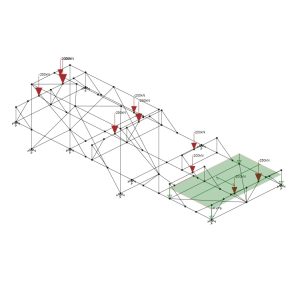
Regardless of software sophistication, validation is essential.
Validation Methods
-
Manual hand-calculation checks
-
Comparison with benchmark examples
-
Laboratory testing or field measurements
-
Cross-analysis using multiple software packages
Validation ensures the engineer maintains control and confidence over the analysis results—critical in safety-related projects.
Open-Source vs Commercial Tools
Commercial Tools
Examples: SAP2000, ETABS, STAAD Pro, ANSYS, Abaqus
Advantages:
-
Industrial-grade solvers
-
Official support and documentation
-
Code compliance modules
-
Advanced post-processing tools
Disadvantages:
-
Licensing cost
-
Vendor dependency
Open-Source Tools
Examples: OpenSees, CalculiX, Code_Aster
Advantages:
-
Free and customizable
-
Transparency of solver algorithms
-
Strong academic and research support
Disadvantages:
-
Steeper learning curve
-
Limited official technical support
Choosing between them depends on project scale, budget, and required features.
Learning Resources and Benchmarks
Engineers can enhance their analysis skills using:
-
Online courses (Coursera, Udemy, MIT OCW)
-
Professional guidelines (AISC, Eurocode, ASCE)
-
Software vendor academies
-
Benchmark publications
-
Conference proceedings
-
Peer-reviewed journals
Using benchmark models ensures that engineers apply tools correctly.
Choosing the Right Tool for a Task
The selection depends on:
-
Structural complexity
-
Material behavior
-
Loading type
-
Required accuracy
-
Project budget
-
Regulatory environment
Examples
-
Simple beam sizing → Hand calcs or basic spreadsheet
-
Multi-story RC building → ETABS, SAP2000
-
Complex industrial frame → STAAD Pro, Robot Structural Analysis
-
Nonlinear material behavior → ANSYS, Abaqus
-
Seismic time-history → OpenSees, Perform-3D
A clear understanding of the project scope ensures efficient tool selection.
Future Directions in Analysis Tooling
Structural analysis is rapidly evolving, shaped by computational advances and industry demands.
Emerging Trends
-
AI-driven structural optimization
-
Machine-learning-based damage prediction
-
Cloud-based analysis for large models
-
Real-time digital twins for industrial facilities
-
Integration with robotics and automated construction
-
VR/AR model interrogation for site teams
These technologies will transform engineering workflows and enhance accuracy, sustainability, and efficiency.
Conclusion
Structural analysis tools form the backbone of safe, reliable, and economical engineering design. From manual methods to advanced FEA, dynamic modeling, and AI-driven optimization, today’s engineers have access to powerful resources that can elevate project quality. By choosing the right tool, validating results, and staying updated with emerging technologies, engineering teams can deliver safer structures, reduce costs, and improve performance.