A Complete Guide for Engineers & Consultants
In today’s engineering landscape, structural calculations software has become an essential tool for delivering accurate designs, faster workflows, and code-compliant documentation. Whether you are designing steel connections, reinforced concrete members, timber structures, or complex industrial frames, the right software can dramatically improve efficiency and reduce human error.
This guide breaks down everything you need to know about structural calculation tools—from their core features to pricing, integrations, common pitfalls, and a selection checklist. If your firm is exploring new software or optimizing its digital engineering workflow, this article will help you make an informed decision.
1. Scope of Structural Calculations Software
Structural calculations software is designed to automate engineering maths, code checks, and design workflows that were once done manually or in spreadsheets. The scope typically includes:
-
Member sizing (steel, concrete, timber, masonry)
-
Load calculations and combination generation
-
Analysis of forces, shear, bending, deflection, and buckling
-
Connection design and detailing
-
Foundation and footing checks
-
Seismic and wind design according to international codes
-
Report generation for authorities or clients
The goal is simple: speed up calculations, reduce errors, and ensure compliance with relevant standards (Eurocode, AS, ACI, AISC, etc.).
2. Template Libraries for Common Members
One of the biggest advantages of structural calculation software is built-in template libraries, which help engineers start designs quickly without reinventing the wheel.
Common templates include:
-
Steel beams, columns, and composite sections
-
RC slabs, beams, shear walls, footings
-
Timber rafters, joists, studs, and frames
-
Retaining walls and basement structures
-
Base plates and anchor bolts
Templates come with predefined equations and code checks, eliminating repetitive manual work. For consulting firms, this dramatically improves project turnaround time, especially during tender design or rapid feasibility studies.
3. Load Combinations and Code Auto-Checks
Modern software automatically generates load combinations based on selected standards. This reduces calculation mistakes and ensures engineers stay consistent across projects.
Typical automated functions include:
-
Dead, live, wind, snow, seismic combinations
-
Ultimate and serviceability limit state checks
-
Automatic load factors
-
Auto-error detection if a combination is missing or invalid
Code auto-checks ensure that every member or connection follows relevant standards. This is crucial for permit submissions, design audits, and value-engineering reviews.
4. Custom Formulas and Spreadsheet Links
Engineering firms often have unique calculations, legacy spreadsheets, or company-specific formulas. Good structural calculation software supports:
-
Custom formula builders
-
Importing spreadsheets (Excel, CSV)
-
Link-based updates (when spreadsheet values change, the software updates automatically)
-
Embedding calculation sheets into final design reports
This is useful for:
-
Special structures
-
Non-standard materials
-
Proprietary design methods
-
Internal QA workflows
It lets firms keep their expertise while enjoying the automation benefits of modern software.
5. Report Formatting for Permit Submittals
One of the most time-consuming tasks in engineering offices is preparing calculation reports for permit authorities, clients, or internal review.
Structural calculation platforms now provide:
-
Auto-generated reports with formulas, references, and diagrams
-
Company branding, logos, and page formatting
-
Appendix management (drawings, tables, spreadsheets)
-
Clear step-by-step calculations
These standardized reports improve communication and reduce back-and-forth with building departments.
6. Audit Trails and Calculation Management
Engineering designs require transparency, especially for government or client audits. Audit trails ensure every change is recorded, including:
-
Version history
-
Modified values
-
Who edited what and when
-
Commenting and approval workflows
Calc management systems help organize:
-
Design packages by project
-
Sheets by discipline (structural, civil, mechanical)
-
Reviewed vs. approved vs. draft documents
This is essential for ISO-certified offices or companies working under strict QA policies.
7. Cloud vs. Desktop Calculation Solutions
Choosing between a cloud-based or desktop-based system affects workflow, pricing, and collaboration. Each option has pros and cons.
Cloud Software
Pros:
-
Accessible anywhere
-
Real-time collaboration
-
Automatic updates
-
Easy license management
-
Data backup and security handled by provider
Cons:
-
Requires stable internet
-
Sometimes limited offline capability
Desktop Software
Pros:
-
Faster local processing
-
Works without internet
-
Often more mature or feature-rich
Cons:
-
Manual updates
-
Harder to collaborate
-
More expensive IT maintenance
Most modern firms now adopt hybrid workflows: cloud for collaboration and review, desktop for heavy-duty analysis.
8. Team Collaboration and Versioning
As engineering projects expand, collaboration becomes a major factor. Structural calculation software now supports:
-
Multi-engineer editing
-
Real-time document syncing
-
Commenting and review notes
-
Version control to track design evolution
-
Shared libraries and company standards
This prevents duplicated work, reduces conflicting calculations, and ensures teams always work on the latest approved version.
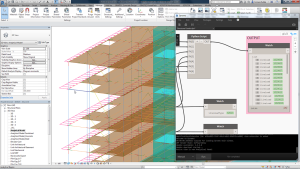
9. Integrations with Analysis Software and BIM
Seamless integration is becoming an industry expectation. Engineers no longer want isolated tools—they need connected workflows.
Key integrations include:
-
Structural analysis tools (ETABS, SAP2000, Robot, STAAD, SpaceGass)
-
BIM platforms (Revit, Tekla, ArchiCAD)
-
CAD tools (AutoCAD, Advance Steel)
-
Project management tools (Asana, BIM360)
Benefits include:
-
Faster model updates
-
Automatic import of member sizes, loads, and geometry
-
Reducing human input errors
-
Smooth transition from analysis → design → reporting
-
Better collaboration between structural, architectural, and MEP teams
BIM integrations are becoming essential for firms working with international contractors or large infrastructure projects.
10. Licensing and Pricing Tiers
Structural software pricing varies widely depending on features and company size.
Typical licensing models include:
Per-User Essentials License
-
Simple calculations
-
Good for small firms
-
Lower cost
Professional Tier
-
Full code checks
-
Integrations
-
Custom formulas
-
Multi-discipline support
Enterprise / Team License
-
Collaboration tools
-
Version control
-
Priority support
-
Unlimited projects
-
Centralized admin dashboard
Subscription vs. Perpetual
-
Subscriptions have lower upfront cost and include updates.
-
Perpetual licenses cost more initially but reduce long-term expenses.
Choosing the right tier depends on:
-
Team size
-
Project complexity
-
Required integrations
-
Frequency of use
11. Typical Pitfalls & QA Checks
While structural calculation software improves productivity, engineers must remain cautious.
Common pitfalls include:
-
Over-reliance on automation without engineering judgment
-
Input errors (wrong loads, units, or material properties)
-
Ignoring code exceptions that the software cannot detect
-
Outdated libraries or templates
-
Inconsistent naming or file management
-
Missing peer review before submission
Recommended QA checks:
-
Manual verification of critical members
-
Load path review
-
Double-check load combinations
-
Cross-check results using a secondary method
-
Use of standardized company templates
-
Peer review process before finalizing reports
Software helps—but it should never replace engineering responsibility.
12. Selection Checklist: How to Choose the Right Software
Before committing to any structural calculation tool, evaluate it with this checklist:
✔ 1. Does it support your required codes?
(Eurocode, ACI, AISC, AS/NZS, BS, seismic, wind, etc.)
✔ 2. Are templates and libraries customizable?
✔ 3. Does it integrate with your analysis/BIM tools?
✔ 4. Is collaboration important for your team size?
✔ 5. Does it provide clear, professional reports?
✔ 6. Are cloud features useful for your workflow?
✔ 7. What is the total cost for your team?
✔ 8. Is vendor support reliable?
✔ 9. Are updates frequent and code-compliant?
✔ 10. Can you transfer existing spreadsheets or formulas?
Evaluating these factors helps ensure long-term value and compatibility with your engineering workflows.
Conclusion
Structural calculation software is transforming the engineering industry by automating manual work, ensuring code compliance, and improving collaboration. From template libraries and automatic load combinations to BIM integrations and cloud workflows, these tools significantly enhance both productivity and accuracy.
For consulting firms like Avesta Consulting, choosing the right software can directly impact project speed, quality, and competitiveness in the market. With the right selection strategy and QA processes, structural calculation tools become a powerful asset for delivering reliable and efficient engineering solutions.
If you want, I can also format this for WordPress, add SEO keywords, meta description, or create a shorter LinkedIn version.