Search results for rail detailing software tend to blend two different intents into one list: general track and alignment design, and structural or reinforcement detailing. In practice these are separate deliverables produced by different teams, often in different tools, and conflating them is why so many software comparisons feel generic. Rail detailing software has to be evaluated against the specific deliverable it produces — corridor geometry, rail-specific components, structural detailing, or coordinated BIM output — not against a single all-purpose scorecard.
This guide sets the scope first, then works through the inputs, modelling capabilities, coordination workflow, and outputs that rail detailing software needs to support, before finishing with practical selection criteria. It deliberately stays out of general structural detailing software or steel bridge design software territory — those are covered elsewhere on our blog — and focuses on what makes rail projects distinct.
What Does Rail Detailing Software Cover?
“Rail detailing” spans a wider range of deliverables than most other detailing disciplines, because a rail corridor is simultaneously a civil alignment, a structural asset, and a system of rail-specific components. Before comparing tools, it helps to separate what each one is actually producing.
Track Geometry vs Structural/Rebar Detailing
track detailing tools are built around alignment, geometry and rail component placement — horizontal and vertical curves, cant, turnouts, and clearances. Structural and rebar detailing tools, by contrast, are built around concrete and steel components — bridges, tunnels, platforms, and their reinforcement. Both are legitimately part of “rail detailing”, but they draw on different engines, different standards, and often different teams, and a platform strong in one is rarely equally strong in the other.
Design Authoring vs Fabrication Deliverables
A second distinction sits alongside the first: design-authoring tools produce the coordinated model and design drawings, while fabrication-oriented tools take a subset of that model — reinforcement, precast components, steelwork — through to shop-level detail such as bar bending schedules or NC files. Knowing which of these two outputs a project actually needs before shortlisting software avoids paying for fabrication depth that a design-stage deliverable doesn’t require, or discovering too late that a design tool can’t produce fabrication-ready output.
Inputs: Survey, Terrain and Alignment
Horizontal/Vertical Geometry and Cant
Every rail detailing workflow starts from the same foundation: an rail alignment software model defining horizontal geometry (tangents, curves, transitions), vertical geometry (grades, vertical curves), and cant (the superelevation applied through curves for ride comfort and speed). These parameters drive everything downstream — track component placement, clearance checks, and drainage falls all reference the alignment rather than being modelled independently.
Data Quality, Coordinate Systems and Change Control
Because so much downstream modelling depends on the alignment, errors or ambiguity at this stage propagate through the entire project. Coordinate system mismatches between survey data, design software and construction setout are a recurring source of rework on rail projects specifically, given the long, narrow, multi-zone nature of a corridor. A clear change-control process for alignment revisions — with downstream models flagged for review whenever the alignment changes — is as much a workflow requirement as a software feature.
Rail-Specific Modelling Capabilities
Track, Turnouts, Stations and Yards
Beyond plain-line track, rail detailing software needs libraries and rules for the components that make rail geometry genuinely specialised: turnouts and crossings, station platforms, and yard track with its own layout logic. Turnout modelling in particular is a common differentiator between platforms — parametric turnout libraries that update automatically with alignment changes save substantial rework compared with manually drafted geometry.
Clearances, Electrification and Corridor Assets
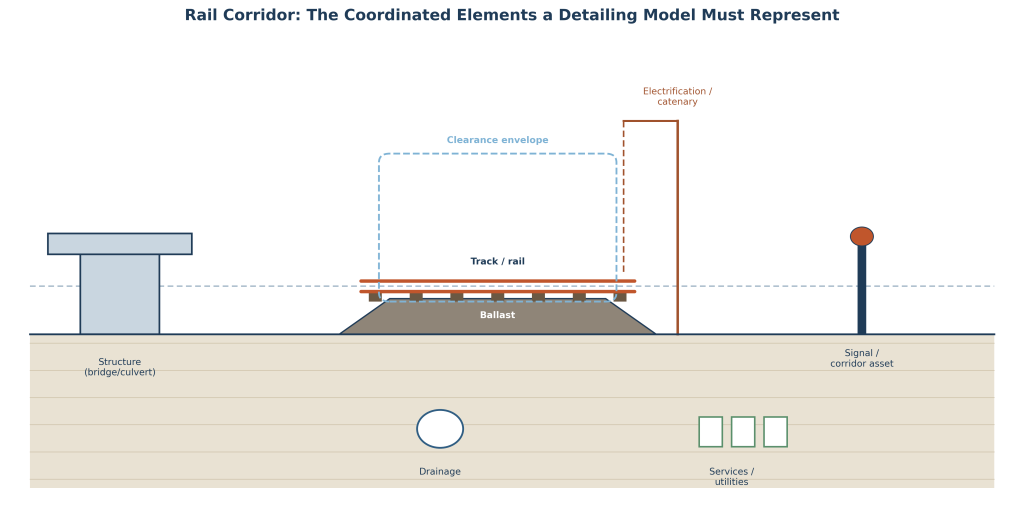
A rail corridor carries more than track. Structure and platform clearances relative to the moving dynamic envelope, electrification and catenary system geometry, and corridor assets such as signalling and communications infrastructure all need to be modelled and checked against the same alignment. Software that treats these as coordinated model elements — rather than annotations added after the fact — makes clearance verification a modelling output instead of a manual cross-check.
Structural and Reinforcement Detailing
Bridges, Tunnels and Concrete Components
Rail corridors include a disproportionate share of structures relative to their footprint — bridges, culverts, retaining structures and, on many projects, tunnels. These components need to be modelled with the same geometric precision as the track they support, and positioned against the same alignment and coordinate system so that structural and track models stay consistent as the design develops.
Rebar Models, Bar Marks and Bending Schedules
rail fabrication detailing for concrete structures depends on accurate reinforcement modelling — bar marks, shape codes, and bending schedules that a fabricator can work from directly. This is a genuinely different skill set and toolset from track geometry modelling, which is exactly why the scope distinction at the start of this guide matters: a platform chosen purely for its alignment capabilities may need to be paired with a dedicated reinforcement detailing tool for structural components.
BIM Coordination and Digital Deliverables
IFC, CDE and Digital Twin Workflows
Rail projects typically involve multiple disciplines and, often, multiple firms working from a shared federated model inside a Common Data Environment (CDE). rail BIM software needs reliable IFC export so that alignment, track, structural and services models can be federated and checked together, and increasingly needs to support digital twin workflows where the design model feeds into asset management after handover rather than being archived once construction is complete.
Clash Detection and Multi-Discipline Coordination
With structures, drainage, services, electrification and track all occupying the same narrow corridor, clash detection is not optional the way it might be on a more spread-out site. Coordinating these disciplines inside a shared model — and resolving clashes before issue rather than during construction — is one of the clearest returns on investment for a proper BIM coordination workflow, and is the reason this guide treats it as core scope rather than an add-on feature.
Drawings, Quantities and Fabrication Outputs
Automated Plans, Profiles and Sections
Rail projects generate an unusually large volume of drawings relative to their footprint — continuous plan and profile sheets, and cross-sections at regular chainage intervals along the entire corridor. Software that generates these automatically from the model, rather than requiring manual sheet-by-sheet drafting, is one of the largest productivity differentiators between platforms on linear infrastructure work.
Schedules, Take-Offs and Revision Consistency
Quantity take-offs, material schedules and bar bending schedules should be derived directly from the model so that a later revision — an alignment shift, a structure resize — updates drawings and quantities together rather than leaving them to drift out of sync. Revision consistency across drawings, schedules and the model itself is a recurring quality risk on long-duration rail projects, where design development can span years and multiple design changes.
How to Select a Rail Detailing Platform
With scope, inputs, modelling capability and output requirements established, the shortlisting decision comes down to how a platform fits the specific project and organisation, not which one appears most often in industry rankings.
Project Scale, Client Standards and Ecosystem
Many rail clients and transit authorities mandate specific software or file formats as part of their design standards, which can narrow the shortlist before technical evaluation even begins. Beyond mandated standards, consider the platform’s ecosystem — does it integrate with the survey, geotechnical, and structural analysis tools your team already uses — and whether its rail-specific libraries (turnouts, standard structure types, regional clearance envelopes) match the region and rail authority you’re designing for.
Pilot Model, Training and Lifecycle Cost
Before committing, run a pilot model using a representative section of an actual project — a curve with a turnout, a structure crossing, a section with services conflicts — rather than a vendor demonstration file. Factor in training time for a discipline-specific tool, ongoing licence and update costs, and how well the platform’s output feeds into your firm’s broader design verification process. The right platform is the one whose learning curve and lifecycle cost your organisation can sustain across the full length of a rail programme, not just its first project.
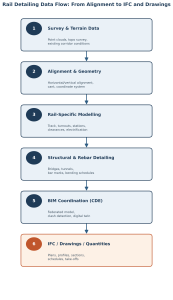
Rail Detailing Data Flow
The stages above are sequential in practice as much as in this guide’s structure — each one depends on the data produced by the stage before it. The flow below summarises how that data moves from initial survey through to the coordinated deliverables issued at the end of the process.
Frequently Asked Questions
Which software is used for railway design and detailing?
Rail projects typically use a combination of tools rather than one platform: alignment and corridor modelling software (such as Bentley OpenRail or Autodesk Civil 3D) for geometry, rail-specific modelling tools for track components, and structural/BIM authoring tools such as Revit or Tekla Structures for bridges, structures and reinforcement. Which combination is used depends on project scope and client standards.
What is the difference between OpenRail and Civil 3D?
Both handle alignment and corridor modelling, but they come from different design philosophies and ecosystems. OpenRail is built specifically around rail geometry, clearance and signalling workflows within Bentley’s infrastructure suite, while Civil 3D is a broader civil design platform with strong roadway and grading tools that many firms extend to rail alignment work. The better fit often depends on which client standards apply and which other tools your team already uses.
Can rail BIM software export IFC?
Most modern rail BIM platforms support IFC export for federated model coordination, though the completeness of that export varies — rail-specific elements like turnouts or electrification components are not always mapped cleanly to standard IFC classes. It’s worth testing IFC export on a representative section of your own model before relying on it for multi-discipline coordination.
How is reinforcement detailing coordinated in rail projects?
Reinforcement detailing for rail structures is typically coordinated through the same federated BIM model used for the wider corridor, with the rebar model checked against the structural geometry and against the clearances and services around it. Bar marks and bending schedules are then generated from that coordinated model so that any later structural revision is reflected consistently in the fabrication output.
Final Thoughts
Rail detailing software should be selected the way any specialised tool is selected — by matching platform capability to the deliverable your project actually needs, rather than by picking the name that shows up most often in a general detailing comparison. Getting the alignment, rail-specific modelling, structural detailing and BIM coordination stages right individually is what makes the final drawings, quantities and IFC handover trustworthy.
At Avesta Consulting, we help rail engineers, track designers and infrastructure contractors define the workflow and coordination structure for a rail project before software is locked in — so that alignment data, structural detailing and BIM coordination stay consistent from concept through handover. If you’re setting up a rail detailing workflow or reviewing coordination on a current project, get in touch with our team. For related reading, see our guides on best structural detailing software and 3D steel modeling software.