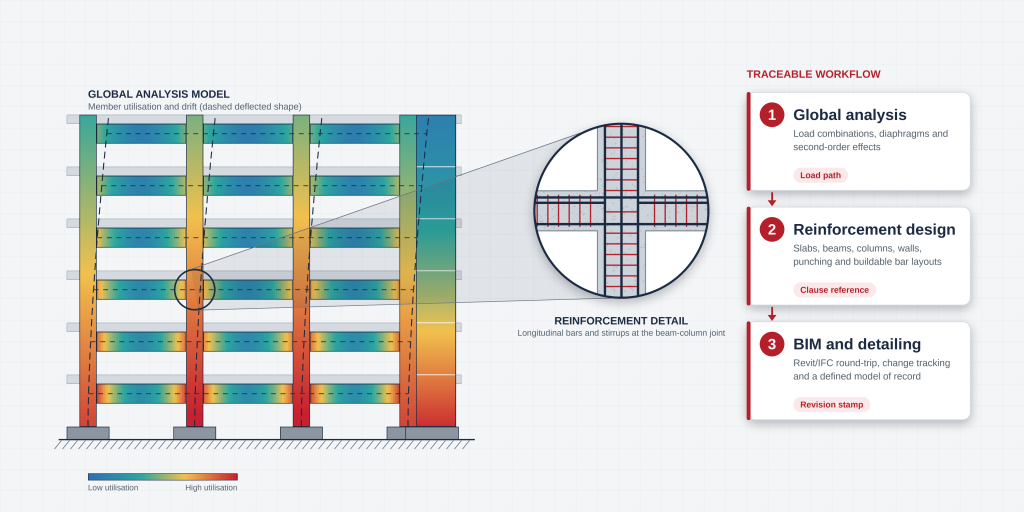
Most comparisons of concrete building design software read like feature inventories: a column of ticks for slabs, beams, columns and walls, and another for supported codes. What they rarely show is where a real project loses time or accuracy, which is at the handoffs between the analysis model, the reinforcement design and the BIM model that goes to the detailer. The most useful way to evaluate this software is to follow one building through the whole chain and ask, at every handoff, whether a number can be traced back to its source.
This guide does exactly that, from model creation to BIM exchange, and ends with a benchmark building and selection checklist. It stays on reinforced concrete buildings. Bridge-specific tools and the general question of which analysis programs exist are handled in our guides to structural analysis programs and structural detailing software.
What Concrete Building Design Software Must Cover
A concrete building is a continuous, indeterminate structure whose behaviour depends on cracking, creep and the stiffness of every slab, beam and wall. Software for it has to do two jobs that are often blurred together.
Global Analysis vs Member Design
Global analysis establishes how the whole building resists gravity, wind and seismic actions: how load travels through floor diaphragms into frames and cores, how far the building sways, and what forces reach each member. Member design turns those forces into section sizes and reinforcement using code resistance equations. Some programs are strong analysis engines with a thin design layer; others are design-first tools built on simplified analysis. A regular low-rise flat-slab building may be well served by simple analysis with transparent design checks, while a tall building with a core or transfer levels needs the reverse. Every force a member is designed for is only as good as the model that produced it, so evaluate the handoff between the halves. Our overview of structural analysis methods covers the underlying analysis types.
Cast-in-Place, Precast and Post-Tensioned Scope
“Concrete” on a vendor page can mean very different things. Cast-in-place design assumes monolithic continuity, so the software must handle moment transfer between slabs, beams and columns and the diaphragm action of the floor. Precast shifts the problem to connections, joints and erection stages. Post-tensioned floors add tendon profiles, secondary (hyperstatic) moments, prestress losses and stressing-stage checks.
“Supports post-tensioning” can mean anything from equivalent balancing loads to explicit tendon modelling with losses. Ask each vendor for a written scope per system with a worked example, and treat anything outside it as a manual workaround.
Model Creation and Load Definition
Modelling errors are the hardest to find later, because every downstream check inherits them.
Geometry, Diaphragms and Supports
Diaphragm behaviour is the modelling decision that most affects results. Rigid floors distribute lateral load by the relative stiffness of the vertical elements, but long narrow plans, large openings, podiums and transfer slabs can behave very differently, and a rigid assumption may understate forces in some walls while overstating them in others. Check that the diaphragm type can be set per floor and that the assumption is reported, not silently defaulted.
Next, check core and wall modelling: wall-frame elements and meshed shells give different force distributions in coupled walls and around openings. Then look at supports. Fixed bases are quick but ignore foundation flexibility, while spring supports need soil parameters from the geotechnical report; our guide to foundation design software covers that side of the interface. Test offsets, rigid end zones and slab-to-column eccentricities too, since they change stiffness and are easy to model inconsistently.
Gravity, Wind, Seismic and Load Combinations
The software should generate code load combinations automatically and let you inspect every one. For gravity, check for pattern live loading on continuous slabs and beams, since a single full-load case can miss critical hogging or sagging moments. For wind, confirm how pressures are applied to diaphragms and whether directional and torsional cases are generated.
For seismic, check the mass source, whether accidental eccentricity is applied, and which methods are available: equivalent static, response spectrum and, where needed, time history. Under AS/NZS 1170 with AS 3600, ASCE 7 with ACI 318, or the Eurocodes alike, a combination you cannot see is a combination you cannot verify.
Analysis Capabilities
Linear, Second-Order and Nonlinear Analysis
Most concrete building design uses linear elastic analysis with an allowance for second-order effects, and that is the baseline to confirm. Second-order (P-Delta) effects matter for sway-sensitive buildings. Check whether the software performs a true second-order analysis, applies code moment-magnification factors, or offers both, and whether the method stays valid for the slenderness of your columns and walls.
Where a project needs inelastic behaviour, such as performance-based seismic design or progressive collapse checks, ask whether nonlinear capability exists and whether it has been verified. We cover that decision in linear vs nonlinear structural analysis and the solver and verification questions in our guide to plastic analysis software. For selection, match the analysis tier to your project mix: nonlinear capability used twice a year is rarely worth paying for, but discovering mid-project that you need it is expensive.
Cracking, Stiffness Modifiers and Construction Stages
A cracked member is substantially less stiff than its gross section. Analyse with gross stiffness everywhere and the building appears stiffer than it is: periods and drift are understated and moments in stiff elements are overstated. Stiffness modifiers are how design codes allow for this. Under ACI 318, for example, strength-level analysis uses member-specific fractions of the gross moment of inertia, from roughly 0.25 for flat plates up to 0.70 for columns, and other codes set their own values.
The software should let you assign modifiers by element type and to the right properties, since a slab’s bending stiffness is not its membrane stiffness. It should allow different sets for strength, drift and deflection checks, and show the values applied. Reusing one cracked set for serviceability deflections is a common error, because deflection also depends on long-term creep and shrinkage.
For taller or staged structures, also check construction-stage and time-dependent analysis: sequential loading, creep and shrinkage, and differential shortening between columns and core walls. These effects change the forces that slabs and transfer elements carry.
Reinforced Concrete Design and Detailing
Slabs, Beams, Columns and Walls
Each element type has its own pitfalls, and each is worth a dedicated test case.
- Check whether design is strip-based or finite-element-based. Strip methods are easy to hand-check. FE-based design handles irregular layouts but is mesh-sensitive, and raw moments need proper treatment (for example Wood-Armer) to account for twisting.
- Look for envelope design across all combinations and pattern loads, combined flexure, shear and torsion checks, and sensible curtailment logic.
- Biaxial bending with axial load, slenderness effects and the governing combination should all be visible. A default effective length is not a decision.
- Confirm whether walls are designed as piers, shells or both, and how boundary elements and coupling beams are handled in seismic regions.
Punching, Shear, Reinforcement and Serviceability
Punching shear often governs in flat-plate and flat-slab buildings, and it is where defaults hide the most. Critical perimeters must adjust for openings, edge and corner columns and column shape, unbalanced moment transfer from the analysis must reach the check, and shear reinforcement options should be explicit. Hand-check at least one interior, one edge and one corner column.
Serviceability follows: drift under wind and seismic actions against project limits, deflection including long-term effects, and for some structures crack width. Pair these with stability checks such as sway amplification and overturning.
Finally, consider constructability. A calculated steel area is not a buildable bar arrangement. Good software converts required areas into bar sizes and spacings that respect limits, lap lengths and joint congestion, and rationalises across similar members so the site is not asked to place dozens of bar variations. Ask how much is automatic and whether the bar layout travels onward to detailing.
Code Compliance and Transparency
Supported Codes and Clause References
“Supports ACI 318” or “supports Eurocode 2” is not a complete statement. Check the edition, because codes change materially between editions and a project may be bound to one. Check whether national annexes or local amendments are implemented. And check which parts are covered: strength design is usually implemented before seismic detailing provisions or ductility classes.
Also check whether the output cites clauses. A result showing the clause reference, the governing combination and the intermediate values can be checked in minutes, while a bare “OK” cannot be checked at all. Confirm how quickly the vendor updates after a new code edition.
Design Overrides, Warnings and Calculation Reports
Every real project involves overrides, such as changed effective lengths, forced bar sizes or adjusted cover. The risk is an unrecorded override. Prefer software that logs overrides, shows them in the report and distinguishes them from defaults. A good program also surfaces warnings in a summary, with the members they apply to, instead of burying them in a log.
Judge the calculation report as a deliverable. Could a second engineer or a certifier follow it without opening the model? This is where independent design verification takes either an hour or a week, which makes report quality one of the strongest practical differentiators between tools.
BIM and Interoperability
In a concrete building, the analysis model is not the model that gets built. It is a simplified, centreline representation made for calculation, while the BIM model holds physical geometry, reinforcement and coordination data. Keeping the two consistent is the real interoperability problem. General IFC federation and clash detection are covered in our rail detailing guide; this section focuses on building analysis and reinforcement.
Revit/IFC Exchange and Round-Tripping
Direct Revit links and IFC export are standard claims, so test what actually crosses. Distinguish geometry transfer, which is usually reliable; analytical data transfer, covering loads, supports, releases and diaphragms, where most failures occur; and reinforcement transfer, which is often one-way or partial. Typical round-trip losses include releases, end offsets, section orientation, load combinations and slab openings.
Pick one representative floor, push it out and back, and compare member lists, sections, supports and load totals before and after. Use the formats your project will actually use, since an IFC structural analysis view and a physical-model export are not equivalent. Also check whether exchange is incremental, or rebuilds the model and discards your design assumptions.
Change Tracking and Model Ownership
Most exchange problems are really ownership problems. Decide which model is the model of record for each kind of information: BIM for geometry and levels, the analysis model for loads and forces, the design software for reinforcement quantities, and the detailing model for bar marks. Then check that the software supports it, with change logs that list modified members, revision stamps that tie a result to a model version, and a clear flag on members whose results are stale after a geometry change.
If a column is resized in BIM and the reinforcement design is not re-run, the software should tell you; if it cannot, you need a manual process with a named owner. Foundation reactions, too, should be traceable to the model revision they came from.
Selection and Validation Checklist
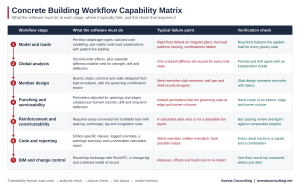
A scorecard shows what a program claims; a benchmark shows what it does. The matrix below condenses this guide into the sequence a building follows through the software.
Benchmark Building and Independent Checks
Build a benchmark that looks like your own work: six to ten storeys, a flat-plate or beam-and-slab floor, a core, one transfer or setback, a few openings and at least one known irregularity. Run it through each shortlisted program, and where possible a hand calculation, using checks agreed in advance.
| Check | What to compare | Why it matters |
| Equilibrium | Sum of vertical reactions against total applied load, for each gravity case | Catches load-definition and support errors |
| Dynamic properties | Fundamental periods and mass participation against an independent model | Exposes stiffness-modifier and mass-source differences |
| Lateral behaviour | Storey drift and base shear distribution between walls and frames | Tests diaphragm and core modelling |
| Slab design | Total design moment across a panel against the static moment | Detects mesh and strip dependence |
| Punching | Interior, edge and corner column checks against hand calculations | Reveals hidden perimeter and moment-transfer defaults |
| Reinforcement | Provided against required areas, bar spacing, and kg of steel per m³ of concrete | Shows whether calculated steel is buildable |
| BIM round trip | Member count, sections, releases and loads before and after one floor | Reveals data lost in exchange |
Set tolerances before running anything. Reactions should balance applied load almost exactly, whereas design moments and reinforcement areas will legitimately differ between methods and should be explained rather than expected to match. Any difference you cannot explain is the finding. A reviewer who did not build the model adds real value, which is the premise of our design verification service.
Team Skills, Support, Licensing and Deliverables
Weigh these alongside technical capability:
- Time to productivity, and whether the team can read the output critically.
- Local code expertise and how fast updates follow a code change.
- Seat, network or cloud models, and fit with workload peaks.
- Data portability. Whether models and results can be exported if you switch.
- Whether calculation reports, reinforcement schedules and quantities meet your clients’ and certifiers’ requirements.
Finally, run a pilot on a completed project where you already know the answer, rather than on a vendor demonstration file.
Frequently Asked Questions
Which software is best for concrete building design?
There is no universal best. The right choice depends on the structural system (cast-in-place, precast or post-tensioned), building height and irregularity, the governing code and edition, and how the output feeds BIM and detailing. Shortlist by workflow fit, then decide with a benchmark building.
Can one program analyse and detail reinforced concrete buildings?
Some programs cover analysis through to reinforcement design and basic detailing output, but fabrication-level drawings and bar schedules usually come from a dedicated detailing or BIM tool. What matters is whether the handoff is traceable and lossless. Our guide to structural detailing software covers the detailing side.
How should cracked concrete stiffness be modelled?
Apply code-permitted stiffness modifiers by element type, typically lower for slabs and beams and higher for columns and uncracked walls, and use separate sets for strength-level analysis and serviceability checks. Deflection needs an additional long-term allowance for creep and shrinkage. Check the displayed modifiers against the governing code.
What should be checked when transferring a model to BIM?
Compare a representative floor before and after: member counts, sections, releases and offsets, supports, load cases and combinations, and any reinforcement data. Also confirm which model is the model of record and how changes are tracked.
Final Thoughts
Choosing concrete building design software is less about which program has the longest list of supported elements and more about whether you can follow a result from the load combination that produced it, through the analysis and reinforcement design, to the model issued for construction. Programs that keep this chain traceable are easier to check, certify and correct.
At Avesta Consulting, we support structural teams and building designers with independent model review and design verification before a concrete design goes into a submission, and our advanced simulation capability covers cases standard building software does not. If you are comparing packages, setting up a benchmark, or want a second look at an existing model, get in touch with our team. For related reading, see our guides on foundation design software and linear vs nonlinear structural analysis.